COAKS301: Keyboard Skills
Sorry, this activity is currently hidden
Section outline
-
Introduction
This module describes the keyboard skills and knowledge required to effectively, and efficiently operate a computer, and manipulate word processing, spreadsheets, and PowerPoint and publisher applications in the production of workplace documents. Having completed this module, the trainee will get familiarized with the keyboard, and its different parts like function keys, numeric keys, keypad keys, control keys, control cursor keys, main typing keys, combination (Ctrl and Shift) keys, and special purpose keys.
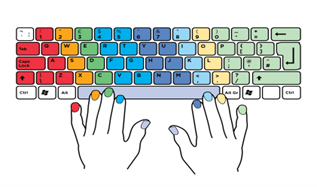
(Source Internet)
Learning Objectives
Upon completion of this module, the trainee will be able to:- Adjust workspace, furniture, and equipment, Ensure work organization meets organizational and occupational health and safety (OHS) requirements for computer operation
- Apply keyboard functions keys, Apply keyboard cursor control keys, Apply keyboard numeric keypads, Apply keyboard main typing keys, Apply keyboard combination keys (shift and ctrl), and Apply touch typing technique to complete a task
- Proofread documents, Improve documents, correct errors, complete a final accuracy check, and Develop speed and accuracy.
- Adjust workspace, furniture, and equipment, Ensure work organization meets organizational and occupational health and safety (OHS) requirements for computer operation
-
-
Students mustMark as done
-
-
-
Students mustMark as done
-
Students mustMark as done
-
Students mustMark as done
-
Students mustMark as done
-
Students mustMark as done
-
Students mustMark as done
-
-
-
-
-